Grounding Is a Reasoning Problem
Grounding is more than finding the correct pixel. It requires understanding intent, context, semantics, and planning the next action.
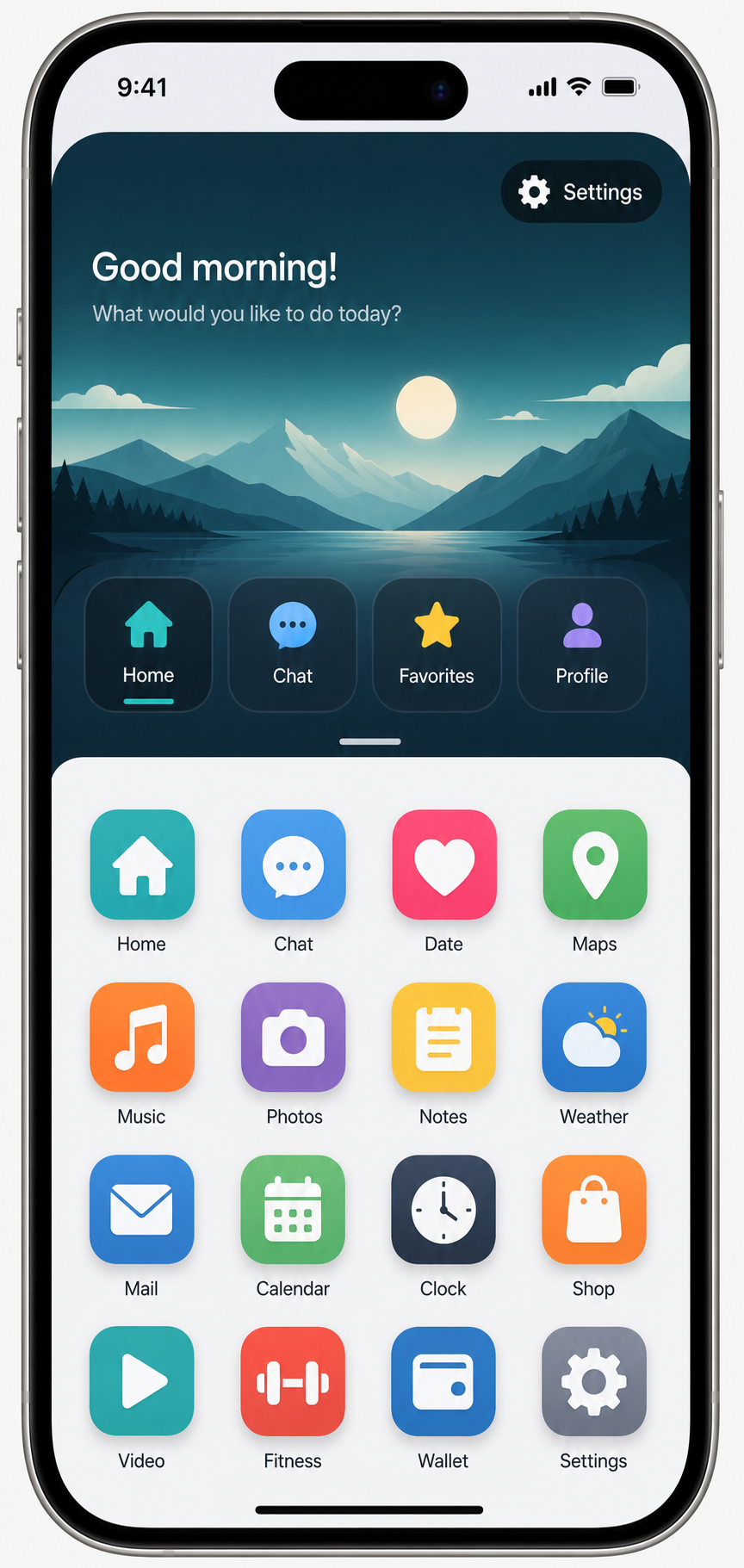
Let's say you have a vision-language model fine-tuned for grounding, and your task is: go to Settings and turn on Bluetooth.
The current view shows two possible Settings targets. One settings button belongs to the top navigation area. The other Settings icon appears inside the app grid. The important question is not simply which pixels look like Settings. The important question is: which Settings target is most likely to help you complete the task?
In this case, the agent should click the Settings app in the grid, because that is where Bluetooth controls are most likely to live. But if you pass this screen to a grounding-only model, such as this grounding model, there is a real chance it will choose the wrong target. It may detect the visible word or icon "Settings" without understanding the user's intent.
That is why grounding needs reasoning or planning. The model has to understand the task, compare candidate targets, reason about the spatial layout, and connect each button's position and context to the intended action.
Grounding is not just finding the matching pixel. It is spatial reasoning, semantic understanding, and action planning working together.
For spatial reasoning, see this reference: SpatialVLM.
The First Step: Add a Planner
The first step in developing a GUI agent is realizing that grounding alone is not enough. You need a planner.
The planner can be any strong vision-language model, such as a Qwen-VL-family model, GPT Vision, Gemini, or another open-source multimodal model. Its job is not just to point at pixels. Its job is to understand the task, inspect the screen, reason about the available options, and decide what action should happen next.
In the Bluetooth example, the planner should recognize that the Settings icon in the app grid is more relevant than the navigation settings button. Then it can pass the correct target to the grounding model for precise clicking.
Planner first. Grounder second.
The planner decides what should be clicked. The grounding model decides where to click.
Can We Plan and Ground at the Same Time?
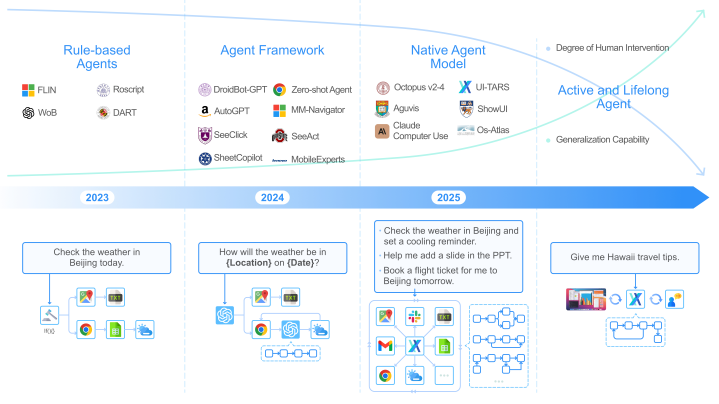
Honestly, this is the million-dollar question.
When I first saw this figure from UI-TARS, I was pretty sure end-to-end GUI agents would dominate. A single model that can observe the screen, understand the task, plan the next step, and ground the exact action sounds like the cleanest possible architecture.
But we are not there yet.
In practice, the current performance of vision-language models can drop when you ask them to plan and ground in one pass. The model has to solve two difficult problems at the same time: decide what action should happen next, and identify where that action should happen on the screen.
That is especially risky for actions like swiping, dragging, or clicking inside complicated layouts, such as dual-view screens, split panels, nested menus, or app grids with repeated icons.
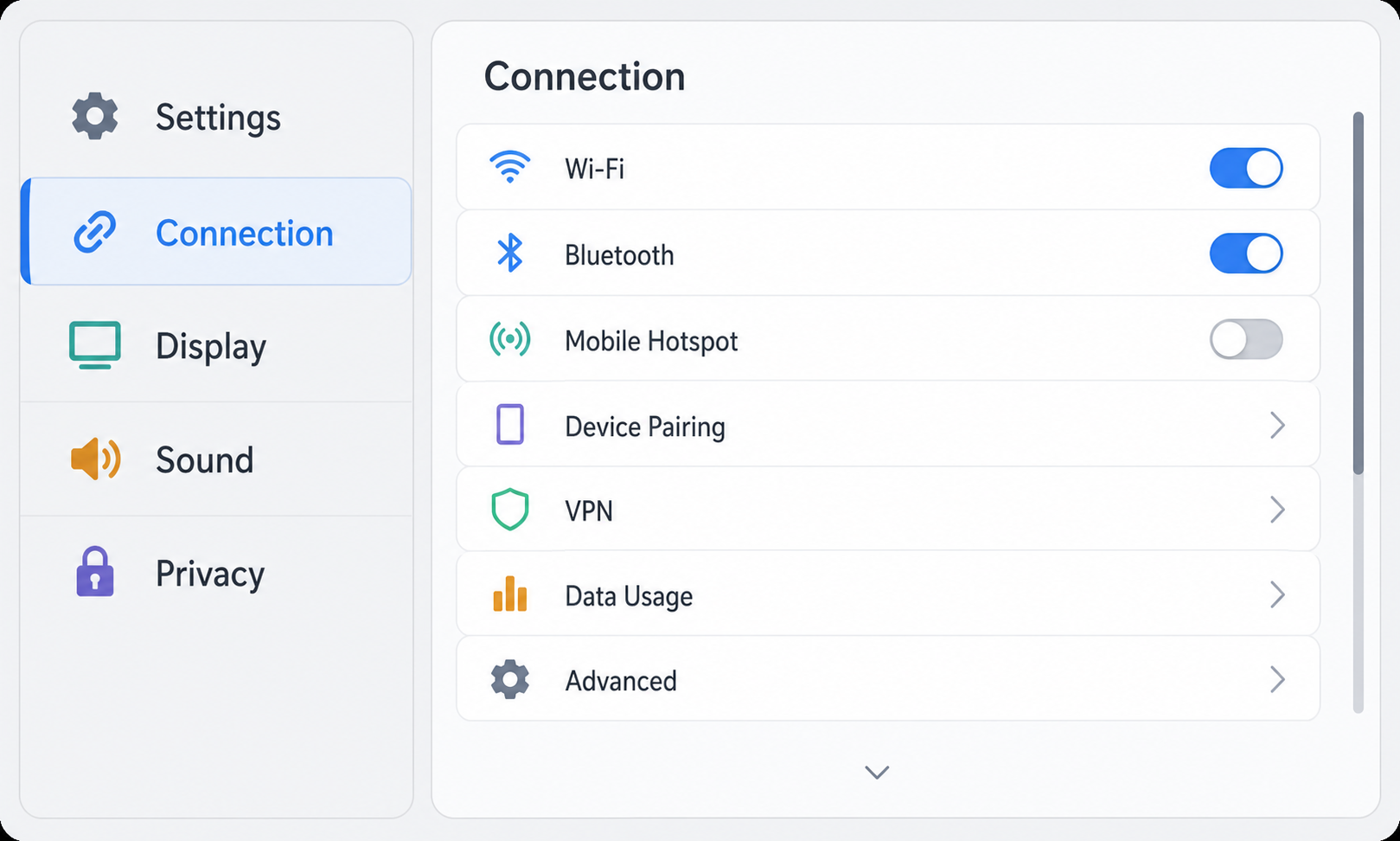
For instance, look at the settings screen above. The main settings buttons are on the left, while the Connection submenu is open on the right. The right pane contains more controls than the visible area can show, so the agent needs to swipe on the right side to reveal the rest of the Connection options.
Now imagine your training data mostly contained single-view layouts. In those examples, a swipe may have worked from a predefined location, such as the middle of the page, or directly on the main visible elements. But this dual-pane view is out-of-distribution. If the agent swipes the middle of the whole screen or swipes on the left navigation items, it may move the wrong region or trigger the wrong control. The planner has to understand that the intended scrollable area is the right-side Connection panel.
End-to-end agents are probably the future. But today, separating planning from grounding gives us more control, more interpretability, and fewer costly mistakes.
Coming soon: This article will be updated.
Join the Discussion
These notes reflect my current understanding of the topic and are intended to encourage discussion rather than present definitive answers. If you have feedback, alternative perspectives, related papers, or spot an error, I'd love to hear from you.